

How to Get Star Ratings in Google Search with Review Schema (2025 Edition)
Table of Contents
- Part 1: The Unfair Advantage: Why Star Ratings in Search Are a Non-Negotiable for Growth in 2025
- Part 2: The Rules of the Game: Google’s Strict Policies You Can’t Afford to Ignore
- Part 3: The Blueprint for Dominance: A Step-by-Step Guide to Implementing Review Schema
- Part 4: Common Mistakes That Will Cost You (And How to Avoid Them)
- Part 5: The Phoenix SEO Geek Difference: System vs. Guesswork
- Part 6: Frequently Asked Questions (FAQ)
- Part 7: Conclusion: Stop Competing, Start Dominating
Part 1: The Unfair Advantage: Why Star Ratings in Search Are a Non-Negotiable for Growth in 2025
In the hyper-competitive search landscape of 2025, visibility is a zero-sum game. Your customers are bombarded with information, and their attention is the most valuable currency. On a crowded search results page, where a dozen blue links scream for a click, how do you instantly signal trust, quality, and authority? The answer is not a bigger marketing budget or a flashier headline. It’s a simple, powerful visual cue: a row of golden stars.
Star ratings, powered by Review Schema, are your secret weapon. They transform a standard, forgettable search listing into a compelling, data-rich rich snippet that commands attention and builds trust before a user even visits your site. The difference is not subtle; it’s a fundamental shift in how users perceive your brand in the most critical moment of their decision-making journey.
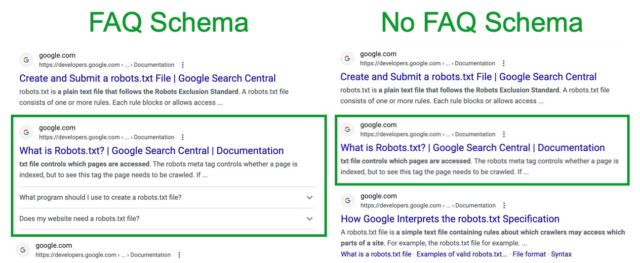
A visual comparison showing how structured data (like FAQ or Review schema) makes a search result stand out, occupying more space and providing immediate value. Source: BrightLocal
This is not just another guide. This is a definitive, world-class blueprint for implementing Review Schema correctly, avoiding the costly mistakes that plague 90% of DIY attempts, and turning that enhanced search visibility into measurable revenue. Drawing on 20 years of front-line experience and the meticulous processes of our proprietary 203-step Omni Protocol, we’;re revealing the exact strategies that drive transformational results for businesses. We will dissect the ‘what’, the ‘why’, and the ‘how’, providing you with the knowledge to either execute flawlessly or to identify the expert partner who can.
The Business Case for Star Ratings: Beyond Clicks to Conversions
Many business owners see star ratings as a cosmetic enhancement—a “;nice-to-have” feature. This is a profound misunderstanding of their strategic value. Rich snippets are not merely decorative; they are a high-performance engine for the entire sales funnel, influencing user behavior from the initial click to the final conversion. The data is unequivocal.
Studies consistently show that pages with rich snippets can see a click-through rate (CTR) increase of up to 58%. In some cases, this can be as high as 82%. This isn’t just a marginal gain; it’s a seismic shift in traffic acquisition. Furthermore, with 95% of customers reading reviews before making a purchase, displaying social proof directly in the search results gives you an almost insurmountable advantage over competitors who don’t.
The impact goes beyond the initial click. By pre-qualifying visitors with trust signals, you attract a more engaged audience, leading to lower bounce rates and higher conversion rates on your landing pages. This creates a virtuous cycle: higher engagement signals to Google that your page is a quality result, which can positively influence rankings over time. In fact, one analysis found that websites with schema rank an average of 4 positions higher than those without.
To move from abstract benefits to concrete business value, consider how each element of Review Schema impacts your bottom line. We’ve distilled this into a clear framework:
Table: From Code to Cashflow – The ROI of Review Schema
| Core Benefit | Direct SEO Impact | Tangible Business Outcome | The Phoenix SEO Geek Advantage |
|---|---|---|---|
| Dramatically Increased Click-Through Rate (CTR) | Your listing visually dominates the SERP, drawing the user’s eye away from competitors with compelling social proof. | More qualified traffic to your product/service pages, even if you don’t rank #1. You capture a larger share of existing search demand. | Our strategies are designed to not just earn snippets, but to maximize their visual appeal for the highest possible CTR, turning search impressions into valuable clicks. |
| Instant Credibility & Trust | Star ratings act as a powerful E-E-A-T (Experience, Expertise, Authoritativeness, Trustworthiness) signal directly in the search results. | Lower bounce rates and higher on-page conversion rates as users arrive with pre-established trust in your offering. | We integrate ethical review generation into our Omni Protocol, ensuring a steady stream of authentic reviews to power your schema and build a fortress of trust. |
| Enhanced AI & Voice Search Visibility | Structured data is the primary language of AI systems like Google’s AI Overviews and voice assistants. Schema makes your data machine-readable. | Your products and services get cited and recommended in AI-generated answers, capturing “zero-click” search traffic and positioning you as a topic authority. | Our deep expertise in AI SEO (AEO & GEO) ensures your schema is optimized for citation, not just for visual display, future-proofing your visibility. |
| Positive Ranking Signals | Higher CTR and on-page engagement are strong positive signals to Google’s algorithm, which can improve rankings over time. | A sustainable competitive advantage that compounds on itself, leading to long-term market dominance and increased organic revenue. | We focus on building a complete E-E-A-T profile where schema is one crucial, integrated component of a holistic authority-building strategy, not a standalone trick. |
Part 2: The Rules of the Game: Google’s Strict Policies You Can’t Afford to Ignore
Before you rush to copy-paste a code snippet, you must understand the single most critical rule that separates successful schema implementation from a failed attempt that could even earn you a penalty. This is where most guides fall short and where expert knowledge becomes indispensable.
The 2019 “Self-Serving” Review Update Explained
In September 2019, Google made a pivotal change to its review snippet guidelines. To combat manipulative practices and increase user trust, Google announced it would no longer display star ratings for “self-serving” reviews. This specifically targeted two common schema types: LocalBusiness and Organization.
In simple terms, if a business (Entity A) places reviews about itself on its own website, Google considers those reviews “self-serving.” Consequently, any Review or AggregateRating schema nested within a LocalBusiness or Organization type on that business’s own domain is ineligible for star ratings in organic search results.
Red Flag Alert: Any SEO agency, consultant, or online guide published after 2019 that tells you to put
AggregateRatingschema on your homepage or wrap it in aLocalBusinesstag is providing outdated, ineffective, and potentially harmful advice. This is a clear sign they are not keeping up with Google’s core guidelines and cannot be trusted with your website’s technical SEO.
What This Means for You (The Common Pitfall)
This policy has direct, practical implications that trip up countless business owners and even inexperienced marketers:
- You cannot simply add review schema to your homepage, “About Us” page, or a general “Testimonials” page and expect stars to appear for your business name in search results.
- You cannot embed a third-party review widget (like one that pulls in your Google or Yelp reviews) and mark it up with
LocalBusinessschema to get stars. Google is smart enough to recognize this as a self-serving implementation.
Attempting these outdated methods is, at best, a waste of time. At worst, it can lead to Google flagging your site for spammy structured data, resulting in a manual action and the loss of eligibility for all rich results.
The Strategic Solution (The Expert Path)
So, if you can’t mark up reviews for your business as a whole, how do you get the coveted stars? The answer lies in a more granular, strategic approach that aligns perfectly with Google’s intent: you must mark up reviews for specific, reviewable “things” that your business offers.
The two most powerful and widely applicable schema types for this expert-led strategy are:
ProductSchema: For tangible goods, e-commerce items, or even well-defined digital products. This is the most robust and reliably supported schema type for review snippets.ServiceSchema: For intangible work performed for a customer, such as “Emergency AC Repair,” an “SEO Audit,” or a “Legal Consultation.”
By nesting your Review and AggregateRating properties within these more specific schema types on dedicated landing pages, you are no longer making a self-serving claim about your entire business. Instead, you are providing valuable, specific feedback about an individual product or service, which Google sees as helpful to users and is therefore willing to reward with a rich snippet. This strategic pivot is the foundation of a successful and compliant review schema implementation in 2025.
Part 3: The Blueprint for Dominance: A Step-by-Step Guide to Implementing Review Schema
This section provides the complete, actionable blueprint. We will move from theory to execution, detailing the exact steps required for a flawless implementation. Follow this process meticulously to maximize your chances of earning star ratings and avoid common pitfalls.
Step 1: Pre-Flight Checklist – Prepare for a Flawless Implementation
Success in schema implementation is 90% preparation. Before writing a single line of code, run through this essential checklist to ensure you have all the necessary components in place.
- Identify the Target Page & Item: Pinpoint the exact page where the schema will live. This must be a page dedicated to a single product or service. For example, a page for “Premium HVAC Filter Model XF-200,” not a general “HVAC Filters” category page. Or a page for “Emergency AC Repair Service,” not your homepage.
- Gather Your Review Data: You must have the actual review content available. For an
AggregateRating, you need the overall average score (e.g., “4.8”) and the total number of ratings or reviews (e.g., “177”). For individualReviewschema, you need the author’s name (e.g., “Jane D.”), the review text itself, and the individual rating given. - Ensure Content-Schema Parity: This is a critical Google guideline. The data in your schema code must be visible to the user on the page. You cannot mark up hidden content. If your schema says the rating is 4.8 based on 177 reviews, that exact information must be clearly displayed on the page for users to see.
- Confirm Technical Access: Determine how you will add the code. You will need the ability to edit the page’s HTML to add a script to the
<head>section, or you will use a CMS plugin or Google Tag Manager. - Bookmark Your Tools: Have these two essential, free tools open in your browser. You will use them in Step 4.
- Google’s Rich Results Test
- Schema.org’s Schema Markup Validator
Step 2: Choose the Correct Schema Type: Product vs. Service
This is the most important strategic decision in the process. Choosing the right schema type ensures you are compliant with Google’s guidelines and are communicating the nature of your offering accurately.
Use Product Schema for:
This is the gold standard for review snippets and should be your default choice whenever applicable. It is used for tangible goods (e.g., an e-commerce product, a specific part you sell) or well-defined, “productized” digital offerings (e.g., a software subscription, a downloadable guide). Google’s documentation and support for Product review snippets are the most extensive and reliable.
Use Service Schema for:
This is used for intangible work performed for a customer. Examples include “Roof Inspection,” “HVAC Tune-Up,” or a professional service like an “SEO Audit.” While Google does support review snippets for the Service type, it is historically less consistently displayed than Product schema. However, for service-based businesses, it is the most semantically correct and appropriate choice.
The Phoenix SEO Geek Benchmark
A top-tier strategy, and a cornerstone of our Omni Protocol, involves creating highly-specific, dedicated landing pages for each core service you offer (e.g., a page for “AI SEO Strategy,” another for “Local Map Pack Optimization”). We then treat each of these services as a reviewable item, applying its own unique Service schema with relevant testimonials. This hyperlocal, service-specific approach not only maximizes eligibility for star ratings but also dramatically improves relevance for high-intent search queries, driving more qualified leads.
Step 3: Generate the JSON-LD Code (The Heart of the Operation)
JSON-LD (JavaScript Object Notation for Linked Data) is Google’;s recommended format for structured data. It’s clean, easy to manage, and doesn’t interfere with your page’s visible HTML. Below are two fully annotated, copy-and-paste-ready templates for the most common use cases.
Template A: Aggregate Rating for a Product (Most Common)
Use Case: Ideal for an e-commerce product page or a page about a specific physical item that has multiple customer ratings.
<script type="application/ld+json">
{
  "@context": "https://schema.org",
  "@type": "Product",
  "name": "ACME Deluxe Widget",
  "image": "https://your-domain.com/images/acme-deluxe-widget.jpg",
  "description": "The finest deluxe widget for all your widgeting needs. Built to last and trusted by thousands.",
  "brand": {
    "@type": "Brand",
    "name": "ACME"
  },
  "sku": "ACME-WDG-DLX-01",
  "offers": {
    "@type": "Offer",
    "url": "https://your-domain.com/products/acme-deluxe-widget",
    "priceCurrency": "USD",
    "price": "29.99",
    "priceValidUntil": "2025-12-31",
    "availability": "https://schema.org/InStock",
    "seller": {
      "@type": "Organization",
      "name": "Your Company Name"
    }
  },
  "aggregateRating": {
    "@type": "AggregateRating",
    "ratingValue": "4.8", // CRITICAL: This value MUST be visible on the page.
    "bestRating": "5",    // Optional, but recommended if not a 5-point scale.
    "worstRating": "1",   // Optional, but recommended.
    "ratingCount": "177"  // CRITICAL: This count MUST be visible on the page.
  }
}
</script>
Template B: Individual and Aggregate Ratings for a Service
Use Case: Perfect for a dedicated landing page for a specific service (e.g., “Emergency Plumbing Repair”) that displays an overall rating and features a few specific customer testimonials.
<script type="application/ld+json">
{
  "@context": "https://schema.org",
  "@type": "Service",
  "name": "Emergency Plumbing Repair",
  "serviceType": "Plumbing",
  "provider": {
    "@type": "LocalBusiness",
    "name": "Phoenix Plumbing Pros"
  },
  "areaServed": {
    "@type": "City",
    "name": "Phoenix"
  },
  "description": "24/7 emergency plumbing repair services for burst pipes, leaks, and clogs in the Phoenix area.",
  "aggregateRating": {
    "@type": "AggregateRating",
    "ratingValue": "4.9", // CRITICAL: This value MUST be visible on the page.
    "reviewCount": "89"   // CRITICAL: This count MUST be visible on the page.
  },
  "review": [
    {
      "@type": "Review",
      "author": {
        "@type": "Person",
        "name": "Jane D." // This name MUST be visible with the review.
      },
      "datePublished": "2025-01-15",
      "reviewBody": "Fast response and very professional. Got me back into my house in no time!", // This text MUST be visible on the page.
      "reviewRating": {
        "@type": "Rating",
        "ratingValue": "5" // The individual rating for this review.
      }
    },
    {
      "@type": "Review",
      "author": {
        "@type": "Person",
        "name": "Mark L." // This name MUST be visible with the review.
      },
      "datePublished": "2025-02-20",
      "reviewBody": "Very reliable service. Arrived quickly and fixed the lock efficiently.", // This text MUST be visible on the page.
      "reviewRating": {
        "@type": "Rating",
        "ratingValue": "5" // The individual rating for this review.
      }
    }
  ]
}
</script>
Step 4: Deploy and Validate the Code
With your code generated, the next phase is to place it on your website and run it through rigorous validation. Do not skip this step; a single misplaced comma can render your entire effort useless.
Deployment Methods
- Manual Method: The most direct approach. Copy the entire
<script>...</script>block and paste it into the HTML of your target page, preferably within the<head>section. This requires access to your site’s source code. - CMS/Plugin Method: For WordPress users, this is often the easiest path. SEO plugins like Rank Math or dedicated schema plugins like Schema Pro provide a user interface where you can select your schema type and fill in the fields, and the plugin handles the code injection.

Many WordPress SEO plugins offer a simple interface to select and configure basic schema types. Source: Brandswift
Validation: The Most Important Step
Validation is not optional. It is the only way to know for sure if Google can correctly read and understand your markup.
- Navigate to Google’s Rich Results Test.
- Paste your page’s URL (if the code is already live) or select the “Code” tab and paste your JSON-LD snippet.
- Run the test. The tool will analyze your code and tell you if the page is eligible for rich results. You are looking for a green checkmark next to “Review snippets.”
- Crucially, inspect for errors and warnings. The tool will highlight any issues. A “critical” error (red icon) means your page is ineligible. A “non-critical” warning (orange icon) means it’s eligible but could be improved. Fix all critical errors immediately.
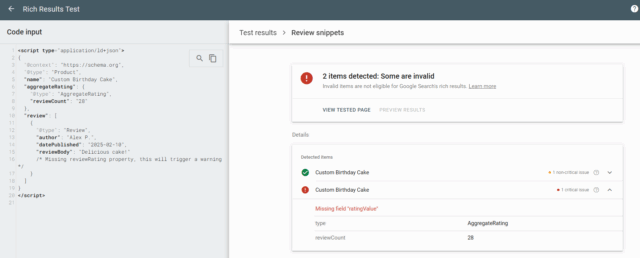
An example of the Rich Results Test identifying a critical error—a missing `ratingValue` field—which prevents eligibility for star ratings. Source: BrightLocal
After fixing errors, you can use the “Preview Results” button to get an idea of how your star ratings might appear in the search results, providing a final visual check before moving on.
Step 5: Request Indexing and Monitor Performance
Once your code is deployed and validated, the final step is to notify Google and track the results of your work.
Request Indexing
While Google will eventually find your changes, you can speed up the process. Go to your Google Search Console account, paste the page URL into the “URL Inspection” tool at the top, and once it retrieves the data, click “Request Indexing.” This puts your page in a priority queue for crawling.
Monitor Performance
Schema implementation is not a “set it and forget it” task. Continuous monitoring is key to ensuring long-term success.
- Check the Enhancements Report: In Google Search Console, navigate to the “Enhancements” or “Shopping” section in the sidebar. Look for the “Review snippets” report. This dashboard is your command center, showing how many pages have valid schema, how many have errors, and tracking the impressions of your rich results over time.
- Analyze Performance Data: Go to the “Performance” > “Search results” report. Click “+ NEW” >; “Search appearance…” and filter by “Review snippet.” This will show you the exact clicks, impressions, CTR, and average position for the pages that are successfully displaying star ratings in the SERPs. This is how you measure true ROI.
By tracking these metrics, you can directly correlate your schema implementation efforts with tangible improvements in search performance, justifying the investment and informing future strategy.
Part 4: Common Mistakes That Will Cost You (And How to Avoid Them)
The path to star ratings is littered with common but costly mistakes. Understanding these pitfalls is as important as knowing the correct steps. An expert avoids these traps instinctively; a novice falls into them, wasting time and risking penalties. Here are the most critical errors to watch for.
| Common Mistake | Why It’s a Critical Error | The Expert Fix |
|---|---|---|
| Marking Up Invisible Content | This is a direct violation of Google’s guidelines. If the review text, author name, or rating value in your code isn’t visible to the user on the page, Google considers it spammy markup. This can lead to a manual action and a complete loss of rich result eligibility for your site. | Rule of Thumb: If a user can’t see it, don’t mark it up. Before you publish, double-check that every piece of data in your JSON-LD script corresponds to clearly visible text on the page. |
Using LocalBusiness for Self-Serving Reviews |
As covered in Part 2, this is an outdated tactic that has not worked since 2019. It immediately signals to Google that you are not current with their guidelines and undermines your site’s technical authority. | Delete this schema immediately from your homepage or general business pages. Pivot your strategy to creating specific Product or Service pages and apply the correct, nested schema there. |
| Missing Required Properties | A schema script is like a form; if you leave mandatory fields blank, the form is invalid. An AggregateRating without a ratingValue and reviewCount is incomplete and will be ignored by Google. |
Trust your validator. The Rich Results Test will tell you exactly which required fields are missing. Never deploy code without first ensuring all mandatory properties (like name for a Product, or ratingValue for a rating) are present. |
| Incorrect Nesting of Properties | Schema relies on a parent-child hierarchy. Placing AggregateRating outside of the main Product or Service entity, or putting reviewRating outside of a Review entity, breaks the logical structure. Google won’t understand what the rating applies to. |
Follow the provided code templates precisely. The rating must be a property *of* the thing being reviewed. The AggregateRating is a child of the Product, and the reviewRating is a child of the Review. |
| Static, Outdated Data (“Schema Drift”) | Your page shows 100 fresh reviews and a 4.9 rating, but your hard-coded schema from six months ago still says 50 reviews and a 4.7 rating. This mismatch between visible content and schema data is another policy violation that can lead to penalties. | Automate! This is where expert implementation shines. A professional setup, like that integrated into the Omni Protocol, dynamically generates the schema from your website’s database. This ensures it is always in sync with the on-page content, eliminating schema drift entirely. |
Part 5: The Phoenix SEO Geek Difference: System vs. Guesswork
You now have the blueprint. You understand the rules, the steps, and the pitfalls. The question that remains is one of execution. While it’s possible to attempt this yourself, the complexity and high stakes often lead to a critical realization: the difference between a world-class result and a failed attempt lies in the gap between knowing the path and having walked it a thousand times.
The DIY/Cheap Agency Reality
Embarking on this journey alone or with a budget agency often looks like this: hours spent deciphering ever-changing Google policies, wrestling with error-free JSON-LD syntax, and manually updating code every time a new review comes in. It’s a full-time job fraught with risk. The most common outcomes are:
- Wasted Time: Weeks or months of effort with no star ratings to show for it.
- No Results: The schema is implemented but contains subtle errors, rendering it invisible to Google.
- The Worst Case: A manual action from Google for incorrect or spammy markup, jeopardizing your entire site’s search visibility.
The Phoenix SEO Geek Gold Standard
We operate on a different principle: results are born from systems, not guesswork. Our approach to schema is not a standalone task; it’s a critical, integrated component of a holistic strategy designed for one purpose: to generate revenue for your business.
- Systematic Implementation: We don’t just “add schema.” We integrate it as a core step within our proprietary 203-step Omni Protocol. This ensures that your schema is not an isolated piece of code but a foundational part of your authority-building strategy, perfectly aligned with your technical SEO, content, and local optimization efforts.
- Guaranteed Accuracy & Future-Proofing: Our experts live and breathe this. We guarantee your schema is not only 100% compliant and error-free today but is also structured to be AI-ready for tomorrow’s generative search engines. We implement dynamic solutions to prevent “schema drift,” keeping you permanently compliant without you ever having to think about it.
- Focus on ROI, Not Just Code: Any developer can paste code. We build a revenue-generating strategy around it. We identify your most valuable services, create the high-intent landing pages, implement the flawless schema, and then track the real business impact—leads, calls, and revenue—proving the ROI of your investment with transparent reporting.
- Verifiable Results: Our clients, like the Phoenix HVAC company that saw a 2,300% ROI or the e-commerce store that achieved 10x revenue growth, achieve these transformational results because every detail, including schema, is executed flawlessly as part of a larger, revenue-focused system.
Part 6: Frequently Asked Questions (FAQ)
Q1: How long does it take for star ratings to appear in Google after implementing schema?
A: After Google recrawls and indexes your page, it can take anywhere from a few days to several weeks for star ratings to appear. The process is not instantaneous and depends on Google’s crawling schedule and algorithmic evaluation. Requesting indexing in Google Search Console can help speed up the discovery process. At Phoenix SEO Geek, we typically see results for our clients within 2-4 weeks, as our holistic optimization within the Omni Protocol encourages faster processing by Google.
Q2: Will adding review schema guarantee I get star ratings?
A: No, it’s not a guarantee. It makes your page eligible. Google’s algorithm makes the final decision on whether to display them based on a variety of factors, including the search query, user location, device, and overall page quality and authority. However, a flawless implementation on a high-quality page, as part of a comprehensive SEO strategy, gives you the best possible chance of success.
Q3: Can I use reviews from Yelp or Google Maps for my website’s schema?
A: No. This is a direct violation of Google’s guidelines, which state that you should not aggregate reviews or ratings from other websites. The reviews you mark up must be sourced directly from your users (first-party reviews) and be visibly displayed on the same page where the schema is placed.
Q4: What’s the difference between `reviewCount` and `ratingCount` in `AggregateRating`?
A: reviewCount is the total number of written reviews (e.g., testimonials with text). ratingCount is the total number of ratings submitted (e.g., users who just left a star rating without a comment). According to schema.org guidelines, you must include at least one of these properties. Providing both if you have the data is the best practice for creating the most robust markup.
Q5: My stars showed up but then disappeared. What happened?
A: This is a common and frustrating issue that can happen for several reasons: Google’s algorithm may have decided the snippet wasn’t relevant for a particular search, a recent site change could have introduced a schema error, or your schema was found to be out of sync with your visible content (schema drift). This is why ongoing monitoring and validation, which is a key part of our service at Phoenix SEO Geek, is absolutely crucial for maintaining long-term results.
Part 7: Conclusion: Stop Competing, Start Dominating
Implementing Review Schema is one of the highest-impact technical SEO actions you can take in 2025. It is the visual and psychological dividing line between a business that blends in and one that stands out. It’s the difference between being scrolled past and being clicked, between being considered and being chosen.
However, as this guide has demonstrated, the path is filled with technical pitfalls, outdated advice, and complex rules that change without notice. Getting it wrong is not just a neutral outcome; it’s a waste of your most valuable resources—time and money—and can even put your site at risk of a Google penalty.
Getting it right requires more than a code snippet. It requires a systematic, expert-led approach. It demands a partner who understands not just the code, but the entire strategic ecosystem in which it operates—from content and local SEO to AI readiness and conversion rate optimization.
Don’t Leave Your Most Powerful Trust Signal to Chance.
Let the experts who have been engineering revenue-driven SEO systems since 2005 build it right for you, the first time.
Take the first step. Contact Phoenix SEO Geek today for a FREE, no-obligation Digital Activation Audit. We’ll analyze your current schema implementation (or lack thereof) and show you exactly how our Omni Protocol will turn your website into a trusted, high-visibility authority in Google search.
Get Your FREE SEO Audit & Strategy Call
Or Call Us Directly: (480) 842-5055
